Before Starting
Your fully customizable and responsive website has been designed to be easy to use and adaptable to your needs. You can manage the structure of your website at any time. In this article, we will see how to change the order of menus and pages.
Go to the Management of Menus and Pages of the Website
Go to the page Website > Main Settings > Menus and Pages to access the general setting of your website.
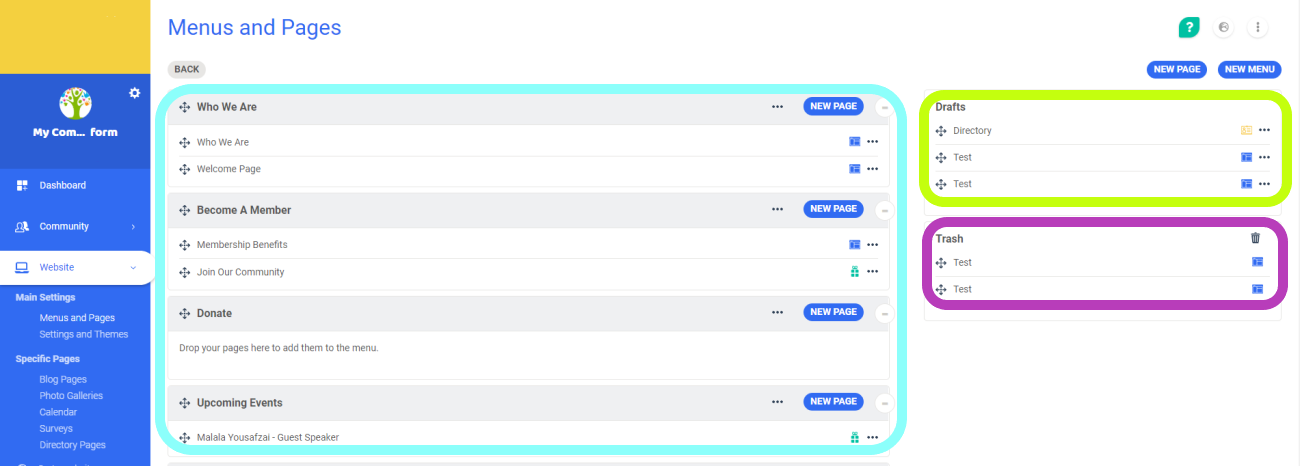
In this space, you have:
- The list of menus and pages that are attached, in the order that you have defined.
- The drafts section with the list of menus and pages waiting to be put online.
- The trash section with the menus and pages that you will potentially delete.
Change the Order of the Website Menus
You can change the order of the pages and the menus by dragging them with the  icon.
icon.
Change the Order of the Website Pages
To move the pages within a menu or to move to another menu, do the same thing by using the icon that is next to the title of the page you want to move.
You can see the modifications in real-time by returning to the website. To go there, click on the option  in the sidebar on your left.
Comments
0 comments
Article is closed for comments.