On the Website feature, it is possible to add a login/registration page. This allows your members to connect or create an account to access their account information or any private content you may have. If you are looking for how to create this page, please consult this article.
It is possible to allow people to create their account from this page, while subjecting their new account to be validated by your administration.
The Concept of Registration Subject to Validation
If you configure this feature, people will be able to register and create an account on your login page. However, they will not have immediate access their account or private content you have on your website. They will have to be validated by you beforehand.
You can validate new accounts by going to the Community > Contacts tab.
You will receive a weekly reminder (if relevant) that certain accounts have not yet been validated.
How to Activate Registration Subject to Validation Feature
- Go to the Website > Settings and Themes page.
- Under "Other Options", you will find the option for a sign-up form and profile page.
- Click on this option and a drop down menu will appear.
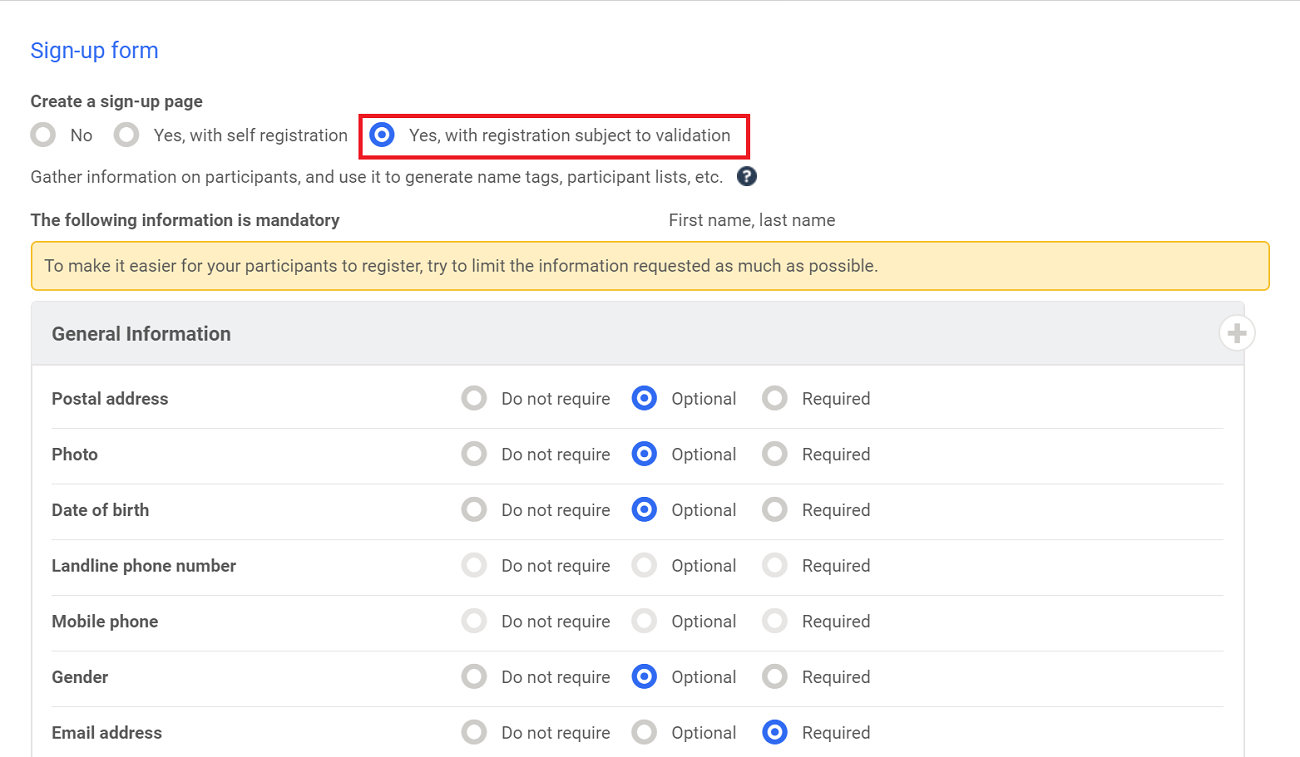
- You will then have three options. Choose Yes, with registration subject to validation.
- You can now choose what information needs to be collected at the time of registration. You have the option between Do not require, Optional, and Required.
- Save. Your changes have now been made.
Comments
0 comments
Article is closed for comments.